
Priskribo
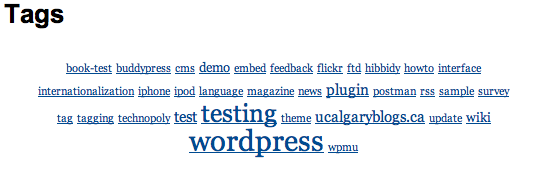
The plugin gives users the oportunity to embed a tag cloud for a site within any page.
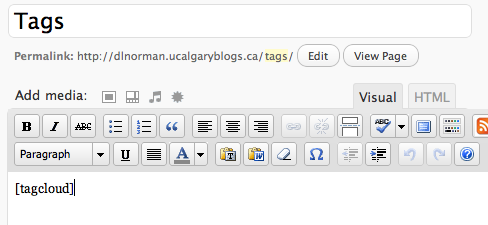
When using the shortcode [tagcloud] when
writing in the content of any page, the user includes in the page, a
tag cloud for posts on that site.
I am working on adding the ability to set options, such as sizes, etc…
Ekrankopioj
Instalo
Tiu ĉi sekcio priskribas kiel instali la kromprogramon kaj ekfunkcii ĝin.
Download the tag-cloud-shortcode.zip file to a directory of your choice(preferably the wp-content/plugins folder)
Unzip the tag-cloud-shortcode.zip file into the wordpress plugins directory: ‘wp-content/plugins/’
Aktivigu la kromprogramon per la menuo ‘Kromprogramoj’ en WordPress
Include the [tagcloud] shortcode in any page you wish to include the tag cloud display.
OD
- How do I use the plugin?
-
When you write or edit the content of a page, simply include
[tagcloud] (along with the brackets) whenever you want the tag cloud to
be displayed. Make sure you activate the plugin before you use the
shortcode. - Why is the tag cloud not displayed, even though I included the shorttag ?
-
The plugin probably has not yet been activated.
- Why does my posted content also show the shortcode [tagcloud]?
-
At the moment, the tag-cloud-shortcode plugin only works when used
in pages. The content displayed by the plugin table probably
malfunctioned if you used the shortcode in a post.
Pritaksoj


Kontribuantoj k. programistoj
“Tag Cloud Shortcode” estas liberkoda programo. La sekvaj homoj kontribuis al la kromprogramo.
Kontribuantoj
Traduki “Tag Cloud Shortcode” en vian lingvon.
Ĉu interesita en programado?
Browse the code, check out the SVN repository, or subscribe to the development log by RSS.
Ŝanĝprotokolo
0.1
- First draft of the plugin. It’s not parameterizable yet, but works.