

Priskribo
BookIvy connects your WordPress site to your BookIvy instance. You enter your licence key
once and confirm the connection in your BookIvy backend. From then on the plugin picks up
everything else automatically: the booking URL and the chatbot address of your instance.
Features
- Appointment calendar – The booking flow is embedded directly into your page with a
transparent background and no visible frame. Its height adjusts automatically to each
step, so there is no inner scrollbar and no empty space below the form. - Events – Embed your event overview, a single event or a whole series. Shown only if
events are enabled for your instance. - Products – Embed your product page, a single product or a product group. Shown only
if products are enabled for your instance. - Entry points – Show only part of your offer on a page: just the rooms, just the
events, or any combination. Everything else stays out of reach, so several embeds can
run side by side, each with its own section. - Chatbot – An AI booking assistant, either as a floating button on every page or
placed inline on selected pages. - No manual configuration – Addresses come straight from your instance and are
refreshed every time you reconnect. There is nothing to copy and paste. - Brand colours – Optionally use the colours defined in your instance instead of the
plugin defaults. Text colour on coloured surfaces is calculated automatically for
readable contrast. - No advertising on your site – The credit line naming the provider and the author is
switched off by default and only appears if you explicitly turn it on.
Shortcodes
Appointment calendar:
[bookivy-calendar]
[bookivy-calendar height="900px"]
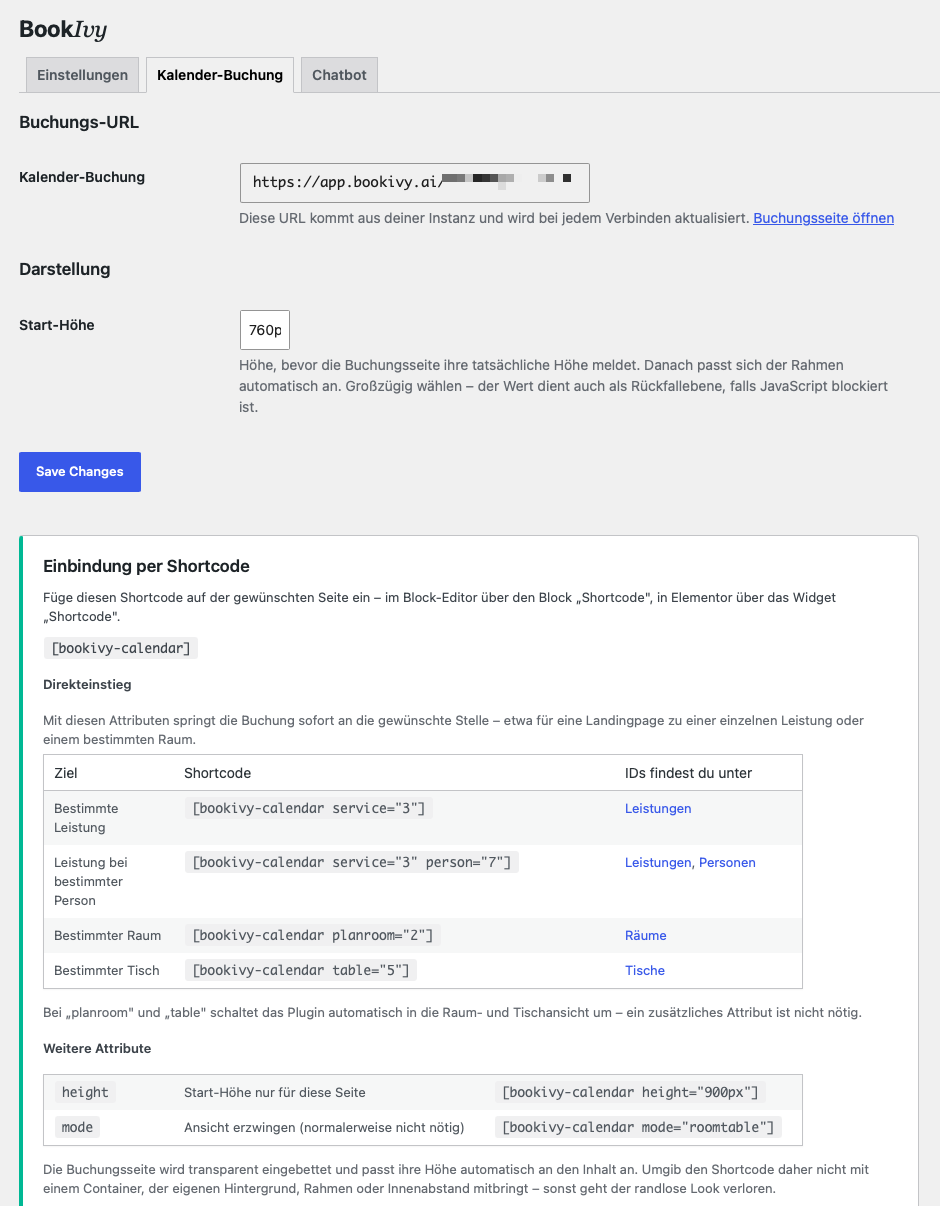
[bookivy-calendar service="3"] – a specific service
[bookivy-calendar service="3" person="7"] – a service with a specific person
[bookivy-calendar room="2"] – a specific meeting room
[bookivy-calendar table="5"] – a specific table
[bookivy-calendar planroom="2"] – the interactive floor plan of a room
Entry points – show only part of your offer:
[bookivy-calendar only="rooms"] – meeting rooms only
[bookivy-calendar only="tables"] – tables and desks only
[bookivy-calendar only="services"] – people and services only
[bookivy-calendar only="events"] – events only
[bookivy-calendar only="products"] – the shop only
[bookivy-calendar only="rooms,tables"] – several of them side by side
Anything not listed is neither visible nor reachable by a link, so several embeds can run
next to each other, each showing its own section. Needs instance version 0.67.12 or newer.
Events:
[bookivy-events] – all bookable events
[bookivy-events event="summer-party-2026"] – a single event
[bookivy-events serie="afterworks"] – a series with all its dates
Products:
[bookivy-products] – the full catalogue
[bookivy-products product="4"] – opens the order form of that product
[bookivy-products group="2"] – a product group
Chatbot:
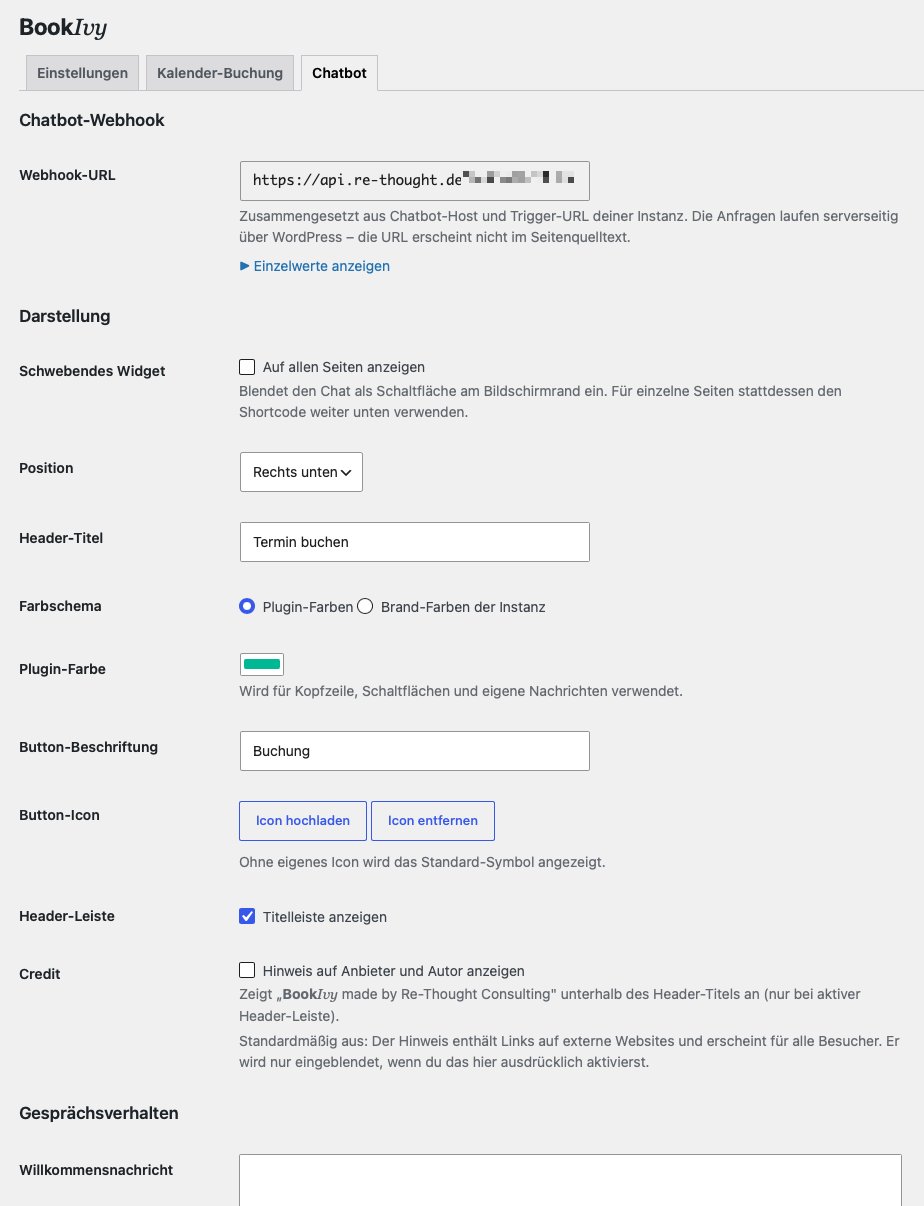
[bookivy-chat-widget]
[bookivy-chat-widget height="500px"]
External services and data processing
This plugin communicates with the BookIvy platform. It cannot work without that
connection, because all content it displays is provided by your instance.
- Licence connection – When you click “Connect”, you are redirected to
https://app.bookivy.ai/admin/endpoint/wp-connect.php. Your licence key and the return
address of your site are transmitted. The platform sends back the master data of your
instance, cryptographically signed. This step happens exclusively in the WordPress
admin area and is always triggered by a logged-in administrator. - Appointment calendar – The booking page of your instance is embedded as an iframe.
Visitor data is exchanged directly between the browser and your instance. - Chatbot – Chat messages are forwarded server-side through WordPress to the chatbot
address stored in your instance, so that address never appears in the page source.
Provider: Re-Thought Consulting, https://www.re-thought.de/
Product information: https://bookivy.ai/
Privacy policy: https://bookivy.ai/ivy/recht/datenschutz/
Legal notice: https://bookivy.ai/ivy/recht/impressum/
Ekrankopioj
Instalo
- Upload and activate the plugin.
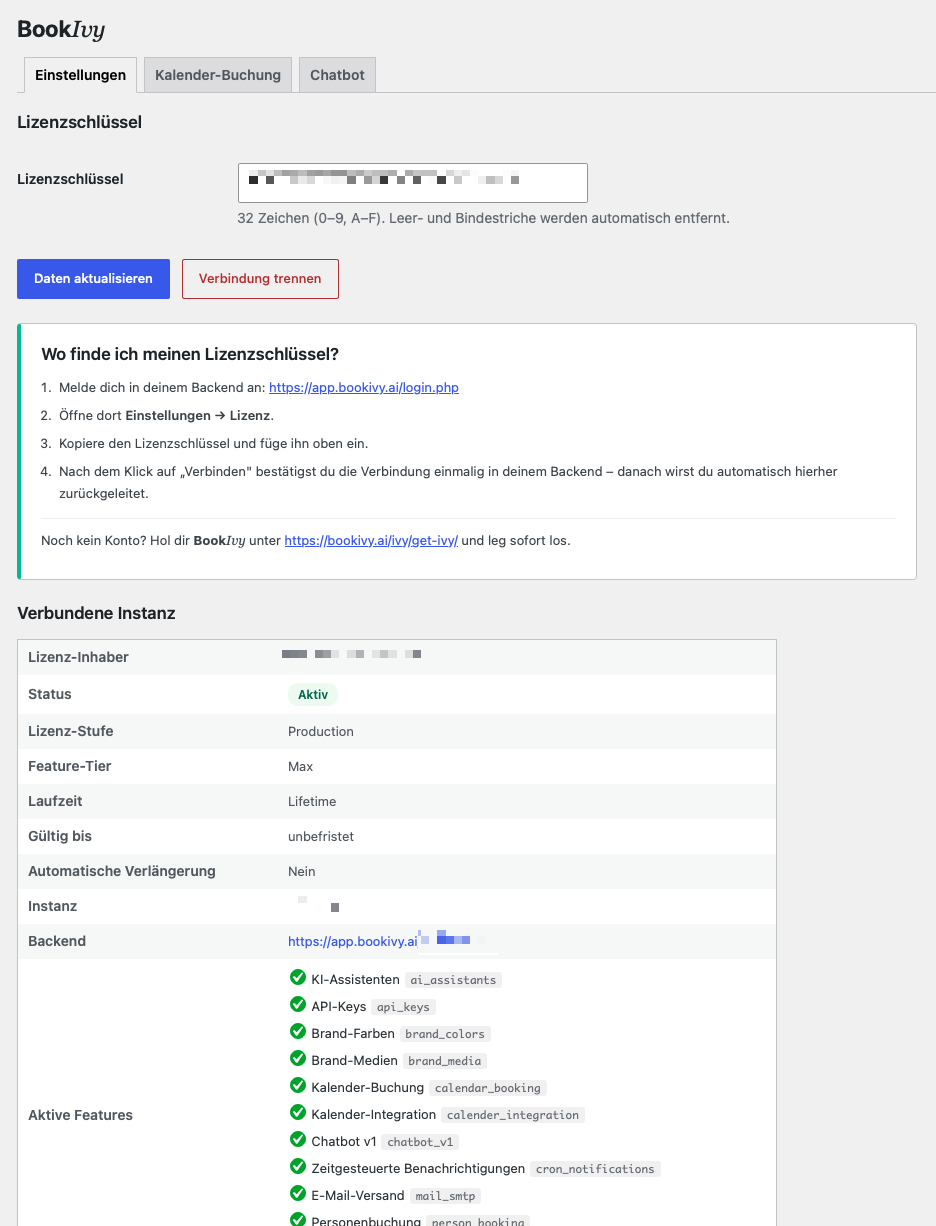
- Open the BookIvy menu and enter your licence key. You will find it in your backend at https://app.bookivy.ai/login.php under Settings Licence.
- Click Connect and confirm the connection once in your backend.
- The Appointment calendar and Chatbot tabs then show the addresses of your instance together with the matching shortcodes. Events and Products appear as additional tabs if those features are enabled for your instance.
Do not have an account yet? You can get started right away at https://bookivy.ai/ivy/get-ivy/
OD
-
A shortcode does not display anything. Why?
-
The plugin embeds whatever your instance provides. If no booking or chatbot address is
available for your account, there is nothing to embed and the shortcode stays empty.
Logged-in administrators see an explanatory note in that spot; visitors see nothing. Click
Refresh data on the Settings tab to fetch the addresses again. -
The “only” attribute has no effect. Why?
-
Entry points exist from BookIvy version 0.67.12 on. Older instances ignore the parameter and
show the full booking page. The Settings tab lists the version your instance reported;
if it says “unknown”, click Refresh data once and it will be filled in. -
What happens when my licence expires?
-
The plugin contains no lock and no countdown of its own. It simply displays what the
platform provided at the last sync. Whether and for how long your account continues to be
served is decided by the platform, not by this plugin. The licence status last reported is
shown in the admin area. -
Will my site advertise BookIvy?
-
Not without your consent. The credit line “BookIvy made by Re-Thought Consulting” in the
chat header is switched off by default. It only appears once you enable it on the
Chatbot tab, and you can switch it off again at any time. -
Can I use the floating widget and the shortcode at the same time?
-
Yes. The floating button and an inline chat can run on the same page without conflicting.
One inline chat per page is supported. -
The booking form is wrapped in a coloured box. What can I do?
-
The booking flow brings its own background and is embedded transparently on purpose. If
you place the shortcode inside a container that has its own background, border or padding,
that container shows through. Remove those styles from the surrounding element. -
The chat shows technical output instead of an answer.
-
On the Chatbot tab, the option “Remove internal output from answers” is enabled by
default and strips tool calls and raw data that were passed through. Check that this
option is still enabled.
Pritaksoj
There are no reviews for this plugin.
Kontribuantoj k. programistoj
“BookIvy” estas liberkoda programo. La sekvaj homoj kontribuis al la kromprogramo.
Kontribuantoj
Traduki “BookIvy” en vian lingvon.
Ĉu interesita en programado?
Browse the code, check out the SVN repository, or subscribe to the development log by RSS.
Ŝanĝprotokolo
2.2.0
- Added: Entry points.
[bookivy-calendar only="rooms,tables"]shows only the parts of your
offer you name – rooms, tables, services, events or products. Anything else is neither
visible nor reachable by a link, so several embeds can run side by side. - Added:
[bookivy-calendar room="2"]opens a specific meeting room. - Changed:
planroomis documented correctly. It opens the interactive floor plan of a room,
which needs the “Floor plans” feature, the matching setting and a published layout – it is
not the way to open a meeting room. Useroomfor that. Existing shortcodes keep working
exactly as before. - Changed:
[bookivy-products product="4"]now opens the order form of that product instead
of filtering the catalogue. - Added: The plugin reads the version of the connected instance and offers the new attributes
only where they work. The Settings tab shows that version. - Fixed: The event and product addresses reported by the platform are now stored instead of
being derived from the instance address every time. - Fixed: Uninstalling removes the two height settings of the Events and Products tabs.
2.1.1
- Fixed: The Events and Products tabs did not appear even when the instance reported the
feature. The feature check looked at the wrong place in the stored connection data.
2.1.0
- Added: Events tab and the
[bookivy-events]shortcode. Embed the event overview, a single
event or a whole series. Events and series are addressed by their slug, so a published
shortcode keeps working even after the address is changed in the instance. - Added: Products tab and the
[bookivy-products]shortcode. Embed the full catalogue, a
single product or a product group. - Added: Both tabs appear only when the connected instance reports the matching feature.
Enable it in your instance and click “Refresh data” to make the tab show up. - Fixed: The “where to find the IDs” links in the admin screens pointed to a fixed reference
instance instead of the instance you are connected to.
2.0.1
- Fixed: The privacy policy URL in the readme pointed to a page that no longer exists. It
now points to the current address, and the legal notice has been added alongside it. - Fixed: Height values are now validated as real CSS lengths (a number plus px, em, rem,
vh, vw or %) instead of only having disallowed characters stripped. This applies to the
setting as well as to the height attribute of both shortcodes.
2.0.0
- Removed: The 14-day grace period and the frontend lock attached to it. The plugin no
longer contains any time limit or access restriction. - Removed: The check against a feature entitlement list. What is displayed now depends
solely on whether the platform provides the corresponding addresses. - Changed: The credit line naming the provider and the author is switched off by default
and has to be enabled explicitly before it appears on the site. - Changed: All tabs are reachable at any time; their content follows the available data.
- Changed: Custom icons replace the third-party icons used before, so that only the
plugin’s own licence applies. - Added: LICENSE.txt with licence and provenance information.
1.7.0
- Added: The colour scheme can be switched between the plugin colours and the brand
colours of the instance. The brand colours are shown on the Chatbot tab together with
their purpose and the full palette; text colour on coloured surfaces is set
automatically for readable contrast. - Added: Direct entry points for the appointment calendar through the
planroomand
table attributes for rooms and tables. The matching view is selected automatically. - Improved: “Refresh data” and “Disconnect” now sit next to each other instead of
overlapping.
1.6.0
- Merged the previous separate plugins for the appointment calendar and the chat into a
single plugin. - Added: Connection to the instance through the licence key; addresses and functions are
picked up automatically. - Added: Interface with three tabs.
- Added: Filter against tool calls and raw data passed through into chat answers, which
can be switched off. - Added: Automatic import of the settings from the predecessor plugins.
- Changed: The shortcodes are now
[bookivy-calendar]and[bookivy-chat-widget]. - Fixed: The response of the chat endpoint no longer contains raw data from the upstream
service.